Multi-factor Model Pipeline
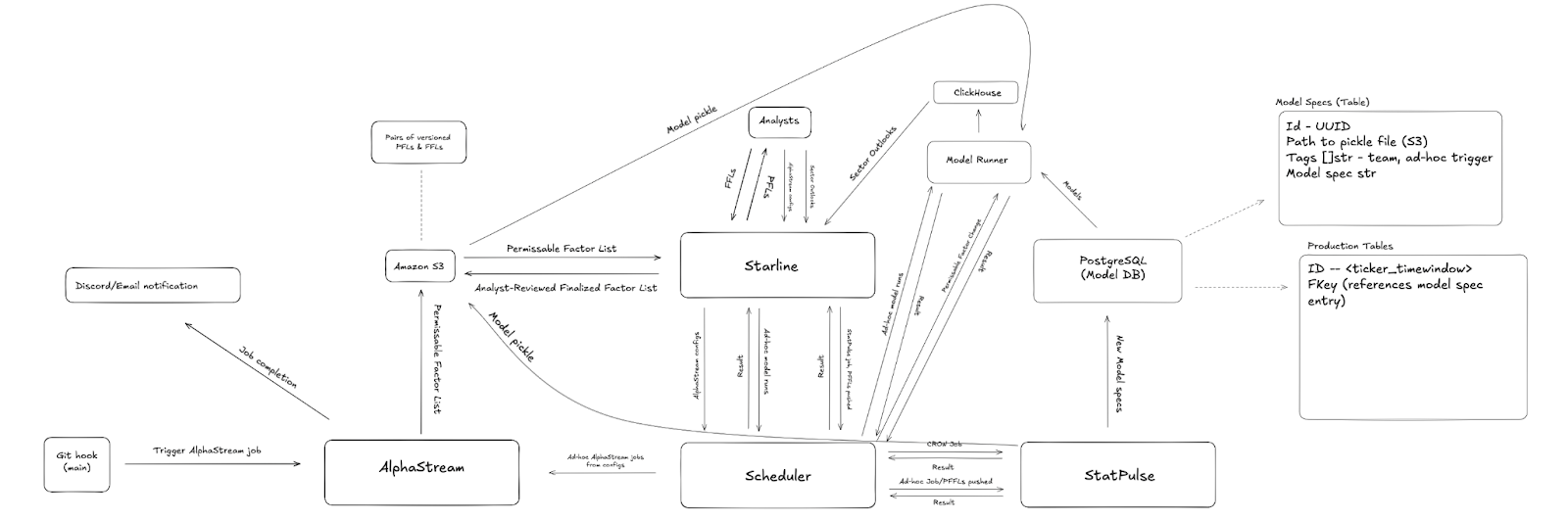
Job flow
1. Initialization
- Triggers AlphaStream job by GithHub action/workflow
- A script to send a request containing whatever call to AlphaStream for job creation will be called and can live in the AlphaStream repository.
- Ad-hoc request from Starline to Model Scheduler to create AlphaStream job
- Insert new permissible factor lists (PFLs) into S3
- On completion, send Discord webhook, ping team role notifying job status and contain a link to preview/draft a finalized factor list (FFL).
S3 (Factor List and pickle Storage)
- Analysts can visit links containing IDs pertaining to a job.
GET /api/v1/models/draftsto view PFLs, ordered by time and paginated. - FFLs can be submitted via
PATCH /api/v1/models/drafts, sending the FFL to the scheduler or directly to StatPulse, this will also purge the original PFL from S3.4. StatPulse
- Starline will either send an HTTP request containing the FFL to the scheduler which will deposit it in S3 with its pair as it creates a StatPulse job, or Starline can handle all of this directly. StatPulse will run a FastAPI or Flask server and will receive a new job on
POST /api/v1/joband will receive this data. - Alternatively, for non-ad-hoc jobs, the scheduler will call StatPulse via a monthly CRON job using the same endpoint.
- StatPulse will create the models and deposit model pickle files in S3 and append this resource ID to the new model specs.
- These model specs will be inserted into PostgreSQL.
- Finally, StatPulse will send a callback to the scheduler to signal completion.
PostgreSQL (Model DB)
- The model DB will be structured as follows with two options
- Either a table containing all models that will have TTLs and are then flushed
- These models will look as follows and either contain two tables, one containing the models and the other containing the prod models, or the prod models will be in their own view:
- Model table
- id: UUID
ticker_timewindow - Pickle identifier in S3
- tags: an array of strings, containing metadata such as job origin, team, and whether the job was ad-hoc
- Model spec, compressed into a string
- id: UUID
- Prod table: whether model is a production model, this is determined by its R^2 compared to other models of the same type, the best R^2 is a prod model
- id: model ID
ticker_timewindow - Fkey referenching model spec
- id: model ID
- This will be recomputed on each run to compare new models to current prod and swap as necessary
5. Scheduler and Model Runner
- Model table
- The scheduler will perform model runs for a specific model on a trigger factor change, this will then create a request to a model runner which will perform model computations and dump the resulting sector outlooks in ClickHouse.
- The alternative for this is ad-hoc model runs where this happens immediately. This behavior has already been defined and implemented in the model runner.
Backtesting
Backtester provides reusable historical evaluation and model-processing infrastructure.